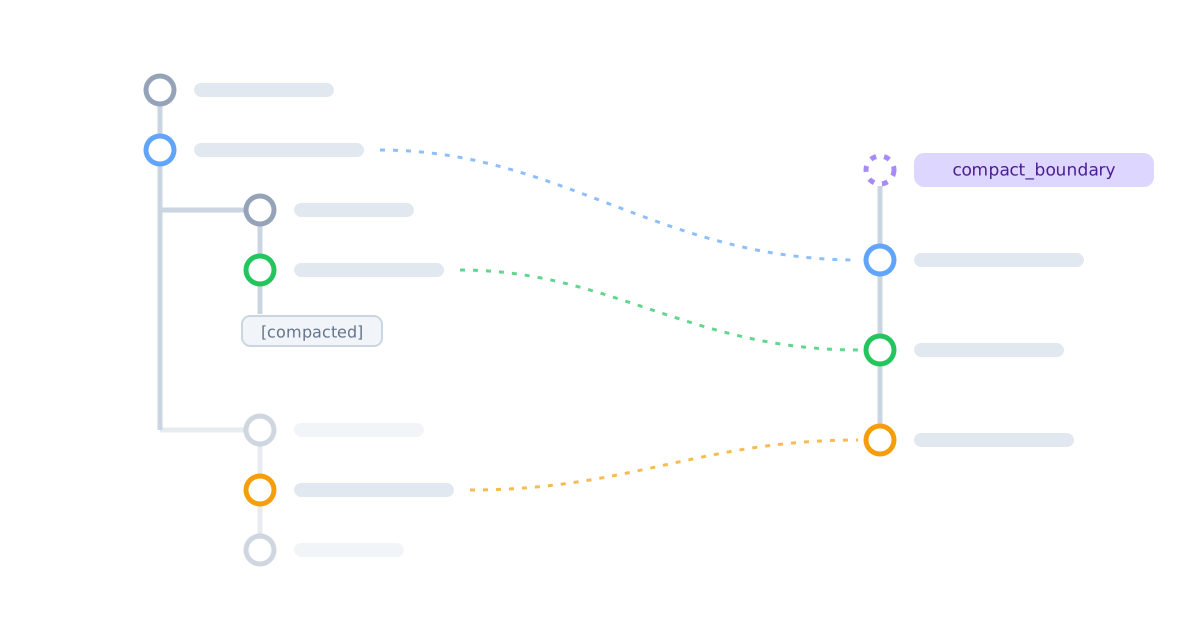
Controlling Claude's context window: compaction and friends
If you’re like me, you want fine control over Claude’s context window. Maybe you’ve even experimented with aggressive forking or surgery on JSONL session files. If so, this post is for you.
Claude Code offers /compact. Hitting Esc-Esc and navigating a few turns back
in the conversation offers two more summarization options [Edit: somewhere
between claude versions 2.1.195 and 2.1.258, the summarize variants were
removed, leaving only “restore”]:
- Summarize up to here replaces the earlier conversation with a summary and leaves the newer messages intact.
- Summarize from here leaves the earlier conversation intact and replaces the newer messages with a summary. There is also Restore conversation, which is basically this option without a summary.
All of these operations stay within one session file. The file is an append-only
tree: each line is an entry (usually a message, sometimes bookkeeping), and most
entries have a uuid and a parentUuid. Compaction appends a special
system entry called a compact_boundary. When Claude Code loads the session,
the boundary entry tells it how to rejigger the tree to construct Claude’s
context.
The SDK provides no supported way to insert a boundary yourself. But you can stop a Query, append a hand-crafted boundary to its session file, and resume the same session. That gives you a powerful primitive: replace Claude’s context window with any ordered list of messages from the session — keep only the messages that matter, splice in your own summary before or after them, resurrect messages from an abandoned branch, or empty the context entirely.
How a session file becomes a context window
The assistant context window — “what the model gets” in the figures below — is
determined by the last compact_boundary in the session file. The only part of
a boundary we need to care about is preservedMessages, but here are some of
the other fields you’ll see if you peek in a session file:
{
  "type": "system",
  "subtype": "compact_boundary",
  "uuid": "<boundary-uuid>",
  "parentUuid": null,
  "compactMetadata": {
    "preservedMessages": {
      # This is where the action is.
      "anchorUuid": "<another-uuid>",
      "uuids": ["msg 2", "msg 3"]
    }
  }
}
uuids is an ordered list of earlier session entries to preserve. anchorUuid
points to either the boundary itself or a summary message appended after the
boundary.
The context window is three pieces glued together, in this order:
- The anchor message. If the anchor is the boundary itself, this piece is empty: the boundary has no text body and never appears in the assistant context.
- The preserved messages, in the order listed in
uuids(originalparentUuids are ignored). - The current branch, the
parentUuid-based path from the anchor message to the last user or assistant entry in the session file.†
That’s it. The boundary does not change the original entries in the JSONL; the loader assembles the context in memory on every load, which is why a later boundary can recover entries cut by an earlier one.
What’s in the session file:
{anchorUuid: "anchor",
uuids: ["msg 2", "msg 3"]}What the model gets:
(Note: the boundary’s parentUuid is null. The dashed line here is
logicalParentUuid, which is ignored when constructing the context window.)
Because the current branch is recomputed on every load, entries appended after the boundary is written — a summary, or the next user turn — become the anchor’s descendants and slot in after the preserved list.
That one rule does all the work: both summary placements below fall out of it, and a synthetic boundary composes cleanly with whatever conversation follows it.
A boundary may preserve any ordered selection of entries, not just an existing branch of the session tree.
Examples
/compact, “up to,” “from,” empty context, and set-context are all just
different choices of anchor and preserved messages.
/compact and “Summarize up to here”: summary first
If you /compact after “msg 3”, Claude Code generates a summary message behind
the scenes and inserts it as a regular user message after the
compact_boundary. That summary message is the anchor, and the final assistant
API response (sometimes spread across multiple entries) goes into the preserved
uuids field — here we’re supposing messages 2 and 3 are the two entries of
that final response.
Note that the assistant context is different from what the UI shows you. Not only is the last assistant response preserved, but it’s after the summary:
What’s in the session file:
{anchorUuid: "summary",
uuids: ["msg 2", "msg 3"]}What the UI shows:
What the model gets:
Summarize up to here uses the same shape. The summary is the anchor, and
uuids contains all the messages after the chosen point.
“Summarize from here”: recent summary last
Suppose your conversation has 4 messages, and you rewind to message 3 with
“Summarize from here”, edit message 3 to 3v2, and then send message 5. The compact boundary uses itself as the anchor, puts
those first two messages into the preserved uuids field, and generates a
summary message which has the boundary as its parent:
What’s in the session file:
{anchorUuid: "boundary",
uuids: ["msg 1", "msg 2"]}What the model gets:
There is no special “from” algorithm and no special summary placement rule. The summary is put at the end of the preserved list simply because it was the child of the anchor and got moved after the preserved list.
A general-purpose set-context
Once you understand boundaries as splices, set-context is straightforward:
- Wait for the current assistant response to appear in the session file.
- End the Query’s input stream and wait for the Query to shut down.
- Append a boundary containing the UUIDs you want Claude to see.
- If desired, append your own summary message as a child of the boundary.
- Resume the same session in a new Query.
Choose the boundary’s anchorUuid based on where the summary belongs:
| Desired context window | anchorUuid | uuids | Summary message |
|---|---|---|---|
| summary, then selected messages | the summary | selected messages | append after boundary |
| selected messages, then summary | the boundary | selected messages | append after boundary |
| selected messages, no summary | the boundary | selected messages | omit |
| empty context window | the boundary | [] | omit |
Here’s what this might look like in practice.
What’s in the session file:
{anchorUuid: "boundary 1",
uuids: ["msg 1", "msg 2"]}{anchorUuid: "summary 2",
uuids: ["msg 1", "msg 2", "msg 3v2", "msg 5"]}{anchorUuid: "custom preamble",
uuids: ["msg 3v2", "msg 4", "msg 7", "msg 8"]}What the model gets:
Gotchas, Caveats, Notes, and Tips
- The loader silently sanitizes tool-call pairing before sending the request. A tool call whose result is missing from context is dropped (the rest of its response survives); a result whose call is missing is dropped too.
- †The rules assume the latest message descends from the anchor of the latest boundary, which is always true for files Claude Code writes itself. If the parent walk ever hits a message earlier than the anchor that wasn’t preserved, the loader treats it as if it hit the anchor.
- †When Claude makes several tool calls in one
response, the file records each result as a child of its own tool call rather
than as a chain, so a parent walk reaches only one of the results. The loader
patches this by pulling the missing calls and results of each response it
walks through back in. (Why not just linearized as the entries are written to
the file? My guess is that each entry’s
parentUuidis meant to be determined when the entry is written, independent of what else has landed in the file by then.) This patching applies to the current branch, not to the preserved list: the list gets exactly the entries it names, so a list that names some entries of a multi-entry response gets only those. - If
uuidsreferences an entry that isn’t in the file, the loader silently gives up on the boundary: no relinking, no discarding, and the walk follows the file’s original parent links (typically, the model sees only what came after the boundary). Duplicates inuuidsare not checked; don’t write them. - The set-context recipe changes conversation history only. It can’t change the system prompt, tools, MCP servers, permissions, or filesystem state.
- The session file may lag behind the SDK’s
resultevent by ~100ms. In step 1 of the set-context recipe, make sure it’s actually flushed before shutting down your Query (e.g. poll the file on change until the result uuid is present). - In native
/compact, the relinked conversation ends with a user-role summary, so Claude Code inserts an assistant message saying “No response requested.” before accepting the next user turn. Native compaction may separately re-inject recent tool calls and results as<system-reminder>text. A synthetic boundary does not get that behavior for free. - This recipe is hacking internals and may break in the future. It was tested on Claude Agent SDK 0.3.258 (bundled Claude Code CLI 2.1.258).
- ‡If you just want to rewind to a message in active
context, you don’t need to insert a boundary at all. You can just restart
your Query and set the
resumeSessionAtoption to point to the target message. However, if you want to rewind to a message no longer in context, you have to insert a boundary entry.
Okay, you made it to the end. Thanks for coming to my office hours. Have fun managing your context windows out there.